Section 21 · Final Revenue Multipliers & Control Plane
21.7Sales SLA enforcement & smart reassignment
Built in the POC- No.
- 21.7
- DMA's reference
- Decision Book p.46
- Phase
- Phase 1
- Autonomy
- L2 · Prepare, then wait for approval
- DMA's decision
- Yes
◆ Amended in v3 of the book.
What DMA asked for · Decision Book p.46
Start a clock when a hot lead or buying signal appears; escalate or reassign if the owner doesn't act within the approved time.
Why it matters to DMA: A scoring system is worth little if high-intent opportunities still sit untouched.
In our words, from DMA's Product Decision Book v3, page 46.
How we do it
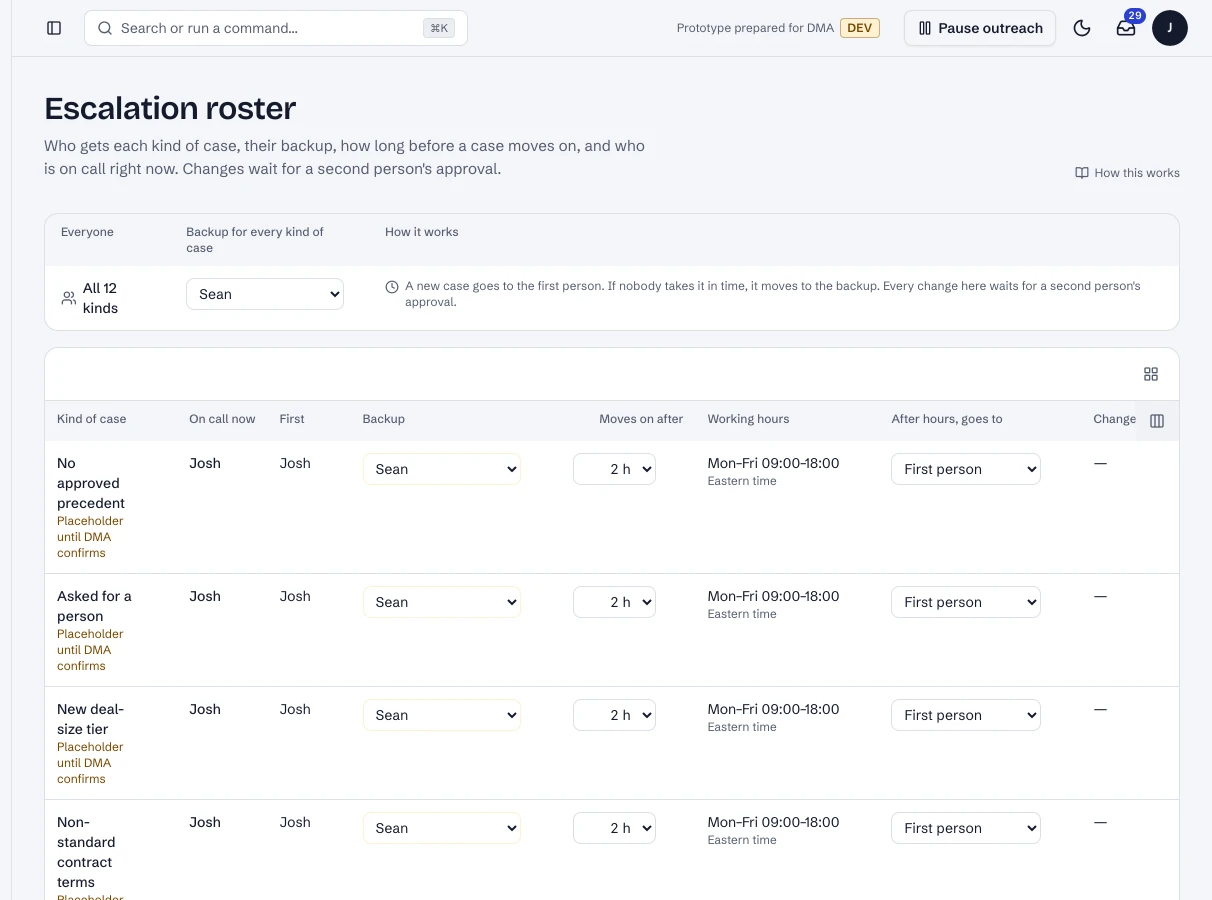
- Every case for a person has a response deadline from DMA's roster: the trigger's person, their response time, and a backup.
- A clock runs every minute. When a deadline passes without the case being taken, it is reassigned to the next person on the roster with a fresh deadline, and they are notified; the case keeps the list of everyone it passed through.
- A website visitor who books a call triggers a hot-lead alert to the host at once, with the site review and the chat summary.
- Josh and the team act from the email in one tap (Take it, Reassign), or from Escalations on the dashboard.
The flow
It plays on its own while it's on screen; hover or use the controls to pause or step through.
A case opens
A visitor asked for a person.
- Person
- Routing
Where the data goes
The same six stages on every page. Nothing reaches Nutshell except through the write gate.
- 1Signals
Source
Hot leads, escalations, replies.
- 2Sync
Copies Nutshell changes into the bridge database
Not involved.
- 3Bridge database
A copy of the CRM data, plus what the AI works out
Cases, deadlines, reassignments, the roster.
- 4AI
Claude models, only through DMA's own gateway
Writes the brief; the clock is code.
- 5Write gate
The only way back into Nutshell: checked, approved when needed, sent once
Not involved.
- 6Nutshell
The system of record
Not involved.
The tables behind it
Drawn from the POC's database catalogue: structure only, no data.
PK primary keyFK reference the database enforces (solid line)ID reference kept by id (dashed line)
| Table | What it holds | Columns |
|---|---|---|
| ctrl.escalations | Cases with their deadline and who they passed through. | 33 |
| ctrl.roster | Who takes each trigger, their response time, the backup. | 10 |
How the tables connect (3)
| Column | Points to | Kept by |
|---|---|---|
| ctrl.escalations.conversation_id | conv.conversations | The application (by id) |
| ctrl.escalations.run_id | agent.runs | The application (by id) |
| ctrl.escalations.decision_id | ctrl.decision_log | The application (by id) |
Worked example
Synthetic demo data: every name, business and number is made up.
The roster and the case
What you see
1.Who, and how fast
The roster sets the person, the response time and the backup per trigger.
What happens in the system
- Bridge database
ctrl.rosterA DMA setting, changed on the dashboard.
A case that isn't taken in time (synthetic).
Timeline
| Time | What happened |
|---|---|
| 10:02 | Visitor asks for a person; case opened for Josh with his response time |
| 10:02 | Email to Josh with Take it and Reassign |
| 10:32 | Not taken: reassigned to Sean (backup), notified |
| 10:35 | Sean takes it in one tap |
In the running POC
1 / 2The escalation roster.
- 1A trigger, its person and response time.
- 2The backup.
Dashboard · Govern → Escalation roster. Captured from the running POC on September 25, 2026; synthetic data.
See it live
Opens the exact screen in the running POC, in a new tab.
| Open | Where | What to try |
|---|---|---|
| Escalation roster | DMA AI dashboard | Response times and backups. |
Status
Built in the POC. This capability runs in the POC today, on synthetic data, end to end.