Section 10 · Human Sales Team Superpowers
10.6Post-call automation
Built in the POC- No.
- 10.6
- DMA's reference
- Decision Book p.23
- Phase
- Phase 1
- Autonomy
- L2 · Prepare, then wait for approval
- DMA's decision
- Yes
What DMA asked for · Decision Book p.23
After the call: summarise it, update Nutshell, capture the promises made and draft the follow-up.
Why it matters to DMA: It is the zero-entry CRM engine: reps talk, the system writes it up.
In our words, from DMA's Product Decision Book v3, page 23.
How we do it
- On an account, "Log a call" takes a Zoom transcript (.vtt or .txt). Picking the file is enough; it's read straight away.
- The call reader copies what matters with the exact words and who said them: the summary, promises either side made, tasks, budget and timing. Code turns "send it Friday" into a real date against the meeting day, and fills in a budget or timeline the model missed from the prospect's own words.
- Everything is staged as one batch on the write gate: the note, the tasks, the field changes and a follow-up email draft. A person approves all of it in one click, or rejects or edits single lines. Items with no supporting quote are left out and listed.
- Nothing reaches Nutshell until the batch is approved. Recording consent follows DMA's consent rules.
The flow
It plays on its own while it's on screen; hover or use the controls to pause or step through.
The rep logs the call
Picks the transcript file on the account.
- Person
- AI
- Rule in code
- Stored data
- Nutshell
Where the data goes
The same six stages on every page. Nothing reaches Nutshell except through the write gate.
- 1Call transcript
Source
A Zoom transcript file.
- 2Sync
Copies Nutshell changes into the bridge database
Mirrors the approved changes back.
- 3Bridge database
A copy of the CRM data, plus what the AI works out
The transcript (encrypted), the facts and the staged batch.
- 4AI
Claude models, only through DMA's own gateway
Reads the call and drafts the follow-up; code resolves dates and money.
- 5Write gate
The only way back into Nutshell: checked, approved when needed, sent once
Holds the batch until a person approves, then writes it once.
- 6Nutshell
The system of record
The note, tasks and fields appear on the record.
The tables behind it
Drawn from the POC's database catalogue: structure only, no data.
PK primary keyFK reference the database enforces (solid line)ID reference kept by id (dashed line)
| Table | What it holds | Columns |
|---|---|---|
| ctrl.approvals | The batch, waiting for one decision, with its readable summary. | 22 |
| ctrl.outbox | Each change in the batch, written once approved. | 28 |
| ai.extracted_facts | Facts from the call, with their quotes. | 15 |
How the tables connect (2)
| Column | Points to | Kept by |
|---|---|---|
| ctrl.outbox.approval_id | ctrl.approvals | The database (foreign key) |
| ai.extracted_facts.prompt_id | agent.prompts | The application (by id) |
Worked example
Synthetic demo data: every name, business and number is made up.
One approval for the whole call
What you see
1.The batch, line by line
Each change shows what it is and the exact words it came from.
What happens in the system
- LLM gateway
call readerCopies quotes and who said them; code resolves dates and money.
- Bridge database
ctrl.approvals · ctrl.outboxEvery change is staged under one batch and waits for one decision.
A synthetic Zoom call with Summit HVAC, as the batch shows it.
The batch waiting for approval
| Change | What | Said |
|---|---|---|
| Note | Call summary: wants more service calls in the north side | — |
| Task | Send the local-search audit by Friday 2 October | "I'll send the audit over by Friday." |
| Field | Budget: $2,000–$3,000 a month | "Ballpark budget is 2-3k a month." |
| Draft | Follow-up email (not sent) | — |
In the running POC
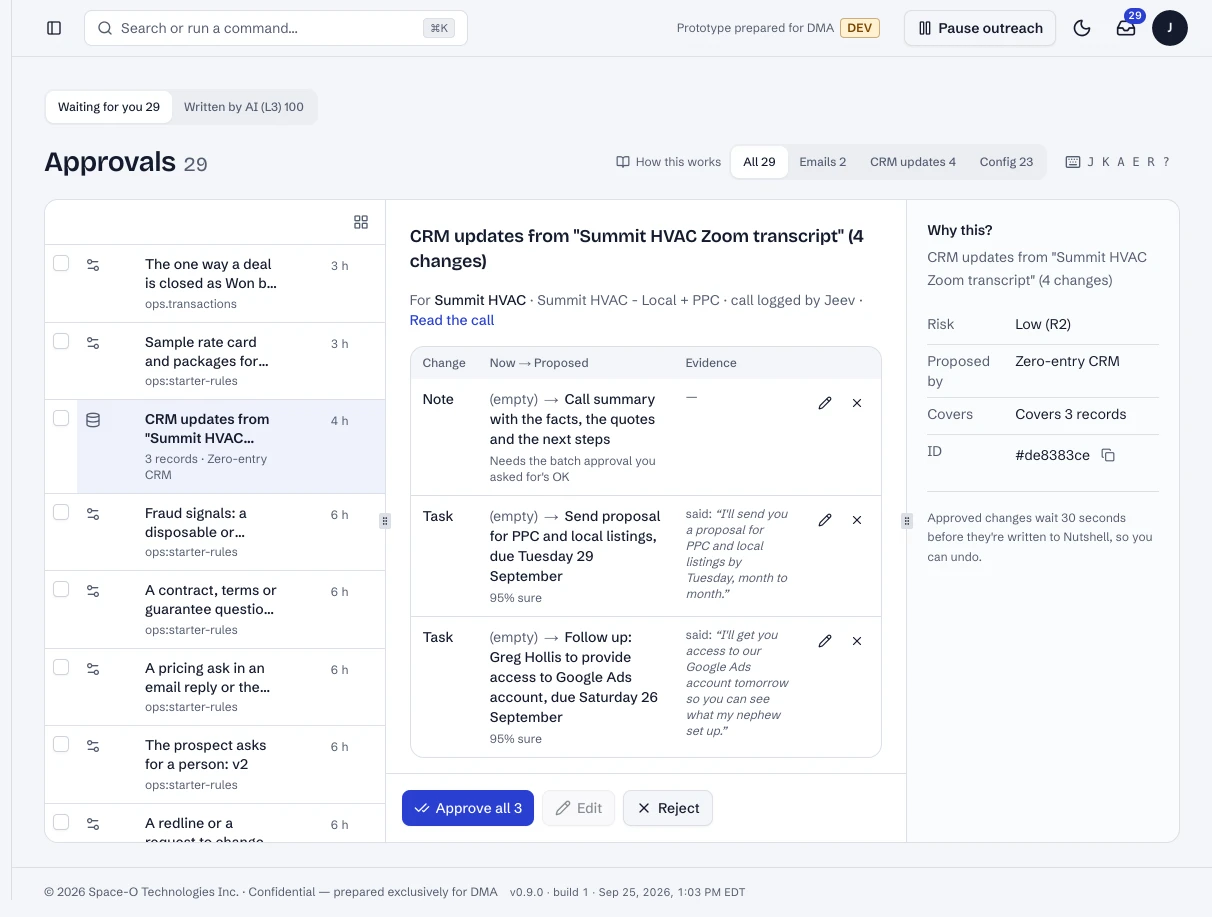
A logged call's CRM changes, waiting as one batch.
- 1Each change and the words it came from.
- 2Approve all in one click.
Dashboard · Approvals, a CRM change opened. Captured from the running POC on September 25, 2026; synthetic data.
See it live
Opens the exact screen in the running POC, in a new tab.
Status
Built in the POC. This capability runs in the POC today, on synthetic data, end to end.