Part B · The screens
B.9Knowledge
The approved library of what the AI may say about DMA: service pages, FAQs, objection answers, case studies and battlecards. A document goes live only after a second person approves it, and the website chat only ever uses live public documents.
- No.
- B.9
- Dashboard address
- /knowledge
What you can do here
Each core task, and how many clicks it takes from this screen.
| Task | Clicks | How |
|---|---|---|
| Add a document | 3 | Knowledge → Add a document → paste the text → Submit for approval. Kind and tags are prefilled from the text; a web page or a PDF can be imported instead of pasting. |
| Let the chat quote a result exactly | 3 | In the same sheet, paste the sentence under "Statements the chat may quote" before you submit (Enter adds another). It must be in the text word for word. |
| Approve a colleague's document | 3 | Approvals → Config → the document → Approve. You see its tags, its statements and the start of the text. Your own documents can't be approved by you. |
| Read a document, its statements and its versions | 2 | Knowledge → its row: the full text, who added and approved it, whether the chat uses it, and every version. |
| Change a document | 3 | Knowledge → Add a document with the same title and kind → Submit. It becomes the next version and waits for approval; the current version stays live until then. |
How it works behind the scenes
- Adding a document saves it as a draft version and files an approval in Approvals → Config: medium risk when it is public, lower when it is internal. Nothing changes for the chat until a second person approves.
- Approving makes that version live and retires the one before it, so each document has exactly one live version. The history is kept and shown on the document.
- Public or internal is enforced by the database, not by the prompt: the website chat's own database role can read only documents that are live and public. Internal documents, such as battlecards, are for DMA's team and the team workspace (DMA AI).
- Tags are stored in the form the chat searches on: the service, from the service taxonomy ("SEO", "PPC"…), and the industry ("Dental", "Restaurant"…). Each statement the chat may quote must be in the text word for word and pass the claims checker's hard rules: no prices, no guarantees.
- How the website chat searches it: for services, FAQs and objection answers it runs a full-text search over the title and text, narrowed to one service when it knows the visitor's need, and takes the best three, each as a short extract (up to 600 characters) with the document's approved statements. It is told to say only what those say.
- Case studies are offered separately and only when one really matches: same industry as the visitor or, when the industry is unknown, the same service. The chat quotes only the case study's approved statements and calls it a sample.
- The same approved statements are the claims checker's library: an e-mail or chat reply that says something about DMA's results must be backed by one of them, or it is rewritten or held.
Rules and switches that apply here
- Four-eyes, checked three times: the author's Approve button is closed, the approvals table refuses the author as the decider, and the database's activation function refuses it again.
- A document can't be made live by editing the database directly: only the activation function can, after an approved approval.
- Kill switches: pausing "Website chat autonomy" or the "Website chat channel" stops the chat using any of its tools, the knowledge search included.
Added
A case study is pasted; its services and industry are prefilled as tags.
- Person
- Rule in code
- Stored data
- AI
- Screen
- 1A person
Source
Pastes text, or imports a public web page or a PDF.
- 2Sync
Copies Nutshell changes into the bridge database
Not involved: knowledge is DMA's own content, not CRM data.
- 3Bridge database
A copy of the CRM data, plus what the AI works out
Each version, its tags, its statements, who added and approved it.
- 4AI
Claude models, only through DMA's own gateway
The chat searches live public documents; the team workspace searches public and internal.
- 5Write gate
The only way back into Nutshell: checked, approved when needed, sent once
The approval is the gate: nothing is used until a second person approves.
- 6Nutshell
The system of record
Not changed.
The tables behind it
PK primary keyFK reference the database enforces (solid line)ID reference kept by id (dashed line)
| Table | What it holds | Columns |
|---|---|---|
| ai.kb_documents | Every version of every document: its text, tags, the statements the chat may quote, and its status. | 17 |
| ctrl.approvals | The approval each new version waits for, and who decided it. | 22 |
How the tables connect (1)
| Column | Points to | Kept by |
|---|---|---|
| ai.kb_documents.approval_id | ctrl.approvals | The application (by id) |
The screen
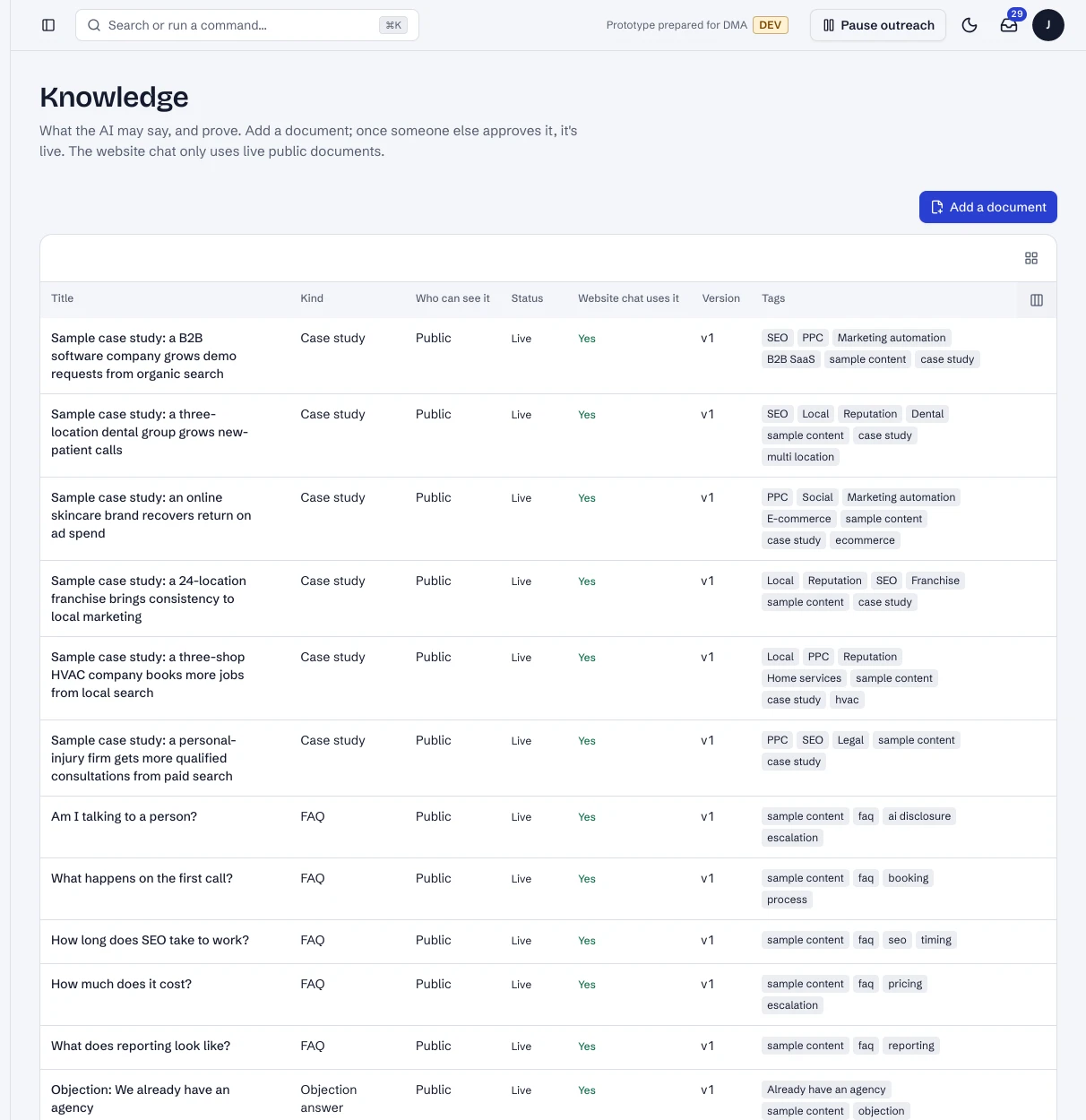
1 / 4Knowledge: every document, who can see it, and whether the website chat uses it.
- 1Add a document.
- 2A sample case study, live.
- 3Whether the website chat uses it: only live public documents.
Dashboard · Knowledge. Captured from the running POC on September 25, 2026; synthetic data.
Not yet
- No edit or retire button yet: a new version replaces the live one once approved.
- Documents are searched whole (full-text search), not split into passages. That suits the prototype's 28 sample documents; finer search comes in only where it helps.
See it live
Opens the screen in the running POC, in a new tab.
| Open | Where | What to try |
|---|---|---|
| Knowledge | DMA AI dashboard | Open a document, or add one: it waits for a second person. |