Part B · The screens
B.12Controls
The kill switches and the sending limits. Pause everything, or one capability at a time; nothing already queued is dropped, it waits until you resume.
- No.
- B.12
- Dashboard address
- /controls
What you can do here
Each core task, and how many clicks it takes from this screen.
| Task | Clicks | How |
|---|---|---|
| Pause all outreach | 1 | Pause outreach, top right on every screen. No confirm: stopping should be instant. |
| Pause from a phone | 1 | The pause link in the daily digest e-mail. |
| Resume | 2 | Resume in the banner → Confirm. Held items are checked again before anything is released. |
| Pause one capability | 2 | Controls → its switch (for example CRM writes or Outbound email). |
| Change the daily send cap | 3 | Controls → click the cap, type the number → Enter. It waits for a second person's approval. |
How it works behind the scenes
- Thirteen switches: the global one; capabilities (outbound e-mail, website chat autonomy, CRM writes, reply handling, contracts and payments, Slack approvals, AI calls); channels (e-mail, website chat); and AI writes to companies, people and deals.
- Each row says in words what stops when it is off: for example, with CRM writes off, approved changes stay approved and are not written to Nutshell; with website chat autonomy off, the widget shows a contact form instead of AI replies.
- The switches are checked in code on every action by the rule engine and the send governor. The nightly check against Nutshell trips the company, people or deal write switch by itself when the data drifts.
- On resume, held e-mails and CRM writes are checked again (consent, staleness, conflicts) before they are released, and the website chat goes back to AI replies.
- The limits table shows the daily send cap and what was sent today, per sending pool, with bounces and complaints.
Rules and switches that apply here
- Switching off takes one click; switching back on asks for a confirm.
- Only people can use the switches: the tool that sets one is for people only and can never be granted to an AI agent.
- A higher send cap is a rule change: it needs a second person.
The tables behind it
PK primary keyFK reference the database enforces (solid line)ID reference kept by id (dashed line)
| Table | What it holds | Columns |
|---|---|---|
| ctrl.kill_switches | Each switch, whether it is tripped, by whom and when. | 9 |
The screen
localhost:13301/controls
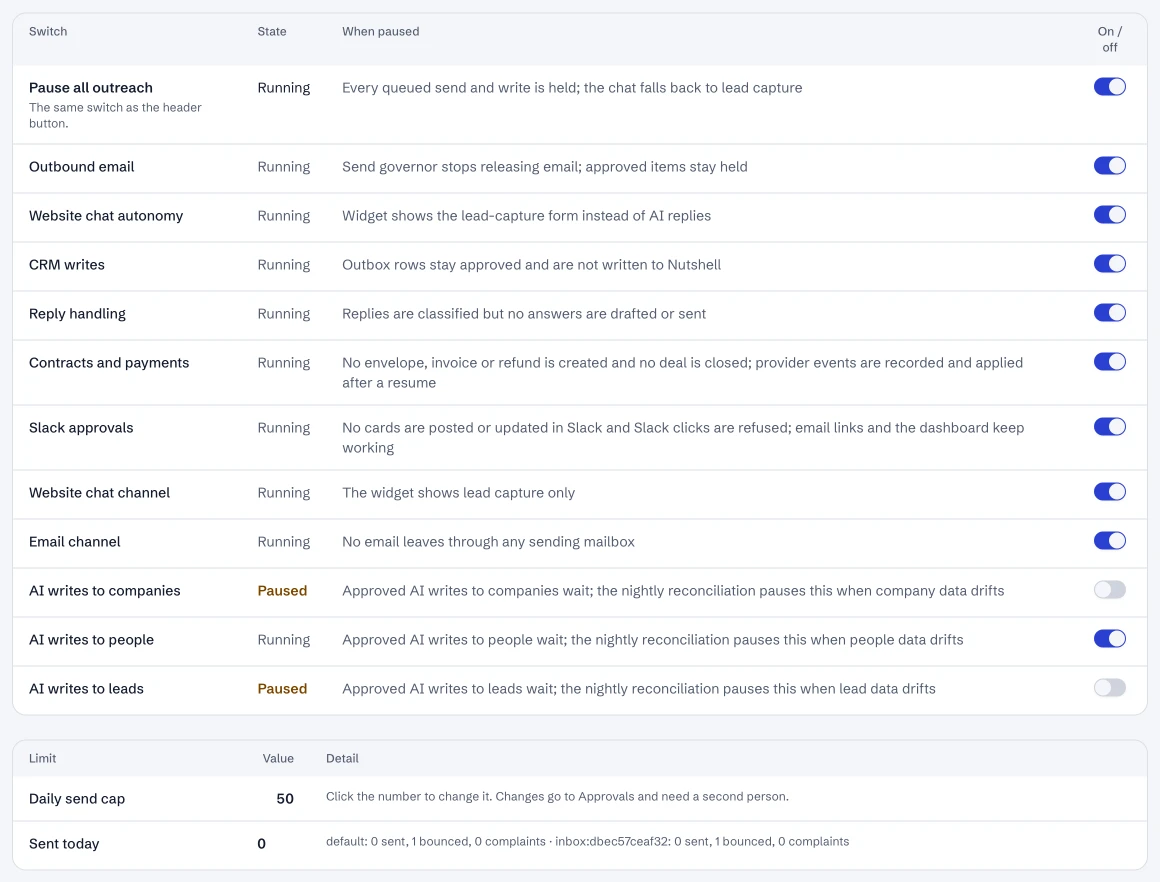
Controls: every switch, and the sending limits (live).
- 1Pause everything.
- 2Website chat autonomy.
- 3CRM writes.
- 4The daily send cap.
Dashboard · Controls, the kill switches. Captured from the running POC on September 25, 2026; synthetic data.
See it live
Opens the screen in the running POC, in a new tab.
| Open | Where | What to try |
|---|---|---|
| Controls | DMA AI dashboard | Each switch says what stops when it's off. |