Part B · The screens
B.8Tools
Everything the AI can do, as a registry: 8 tool servers split by risk and the 40 narrow tools they offer, with which agents hold each one. New servers can be added; nothing they offer runs until someone else approves it.
- No.
- B.8
- Dashboard address
- /tools
What you can do here
Each core task, and how many clicks it takes from this screen.
| Task | Clicks | How |
|---|---|---|
| See a server's tools and who holds them | 2 | Tools → Show tools on the server's row: each tool's purpose, risk and the agents that may use it. |
| Add a tool server | 3 | Tools → Add server → paste its address → Discover & save. You see what it offers and any warning; it waits for a second person. |
How it works behind the scenes
- Tools are narrow and intent-level ("book meeting", "propose CRM update"); there is no general "run a query" tool.
- The servers are split by risk: public (the website chat's small, read-mostly set), internal read, internal write, external e-mail, documents, untrusted web fetch, control and transactions. The website chat can only reach the public server.
- Each tool carries a risk level (R0 to R3) and the lowest autonomy it needs; the rule engine checks every call against the agent's grant, the kill switches and the rate limits.
- Adding a server reads its tool list, flags any tool description that reads like instructions to the AI, pins each tool to the exact definition seen, and files a rule for a second person's approval. No agent holds the new tools until a grant is approved on Agents.
Rules and switches that apply here
- An added server's tool whose definition changes after approval is refused and switched off, marked "changed since approval — needs review".
- Kill switches can stop any capability; the website chat's tools stop with "Website chat autonomy" or the "Website chat channel".
The tables behind it
PK primary keyFK reference the database enforces (solid line)ID reference kept by id (dashed line)
| Table | What it holds | Columns |
|---|---|---|
| agent.mcp_servers | The tool servers, their risk class and database role. | 10 |
| agent.mcp_tools | Every tool: purpose, risk, minimum autonomy and rate limit. | 13 |
How the tables connect (1)
| Column | Points to | Kept by |
|---|---|---|
| agent.mcp_tools.server_key | agent.mcp_servers | The database (foreign key) |
The screen
localhost:13301/tools
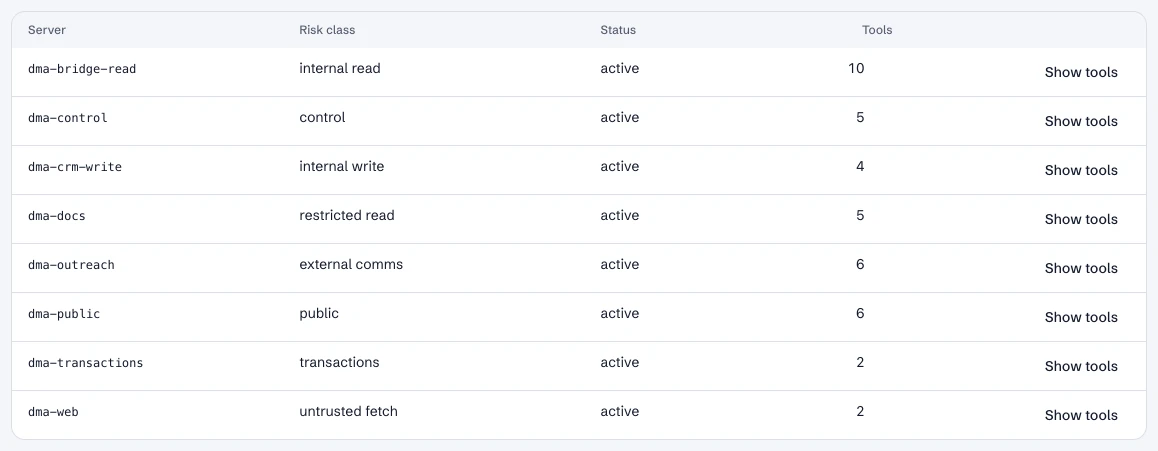
Tools: the servers by risk class and how many tools each offers.
- 1The website chat's public server.
- 2The CRM write server: changes to Nutshell go through the write gate.
Dashboard · Build → Tools. Captured from the running POC on September 25, 2026; synthetic data.
Not yet
- The tool list itself is read-only here; which agent may use a tool is changed on Agents.
See it live
Opens the screen in the running POC, in a new tab.
| Open | Where | What to try |
|---|---|---|
| Tools | DMA AI dashboard | Show tools on a server to see who holds each one. |