Part B · The screens
B.7Agents
The ten AI workers, what each one does, its prompts, its model and the tools it may use. Any change is tested, then approved by someone other than its author before it goes live, and can be reverted.
- No.
- B.7
- Dashboard address
- /agents
What you can do here
Each core task, and how many clicks it takes from this screen.
| Task | Clicks | How |
|---|---|---|
| Change an agent's instructions | 3 | Agents → the agent (the first prompt opens ready to edit) → type → Test and submit. The checks run, then it waits for a second person. |
| Give or take away a tool | 3 | Agents → the agent → the tool's switch. A new version is filed for approval at once; Undo in the message takes it back. |
| Change the model | 3 | Agents → the agent → pick the model, then submit the draft. |
| Revert to the previous version | 3 | Agents → the agent → Revert. The revert is itself a change that a second person approves. |
How it works behind the scenes
- Each agent has a live version: its model, its prompts and the tools it may call, each tool with the highest level of autonomy it may use (L0 to L4). A tool can never run above the agent's own limit.
- A change becomes a new version. The automatic checks run on every change, and an AI Lab test suite scores it where one exists ("Eval passed · 100% of cases"). Then someone other than the author approves it in Approvals → Config.
- The database activates a version only through its activation function, only with an approved approval and a passing check, and never for the author's own change. Agents can't change their own settings.
- Autonomy is enforced inside the tools and the rule engine, not by the prompt: a prompt can't talk an agent into doing more than its grant.
- In this prototype, prompts not yet approved in the registry run from Space-O's reviewed baseline, labelled "running unapproved baseline (repo)". In production only approved versions run.
Rules and switches that apply here
- Four-eyes on every change: the author can't approve it.
- Each agent has a maximum autonomy; each tool grant is capped by it.
- Kill switches pause capabilities (outbound e-mail, CRM writes, website chat autonomy and more) without touching the agents' settings.
The tables behind it
PK primary keyFK reference the database enforces (solid line)ID reference kept by id (dashed line)
| Table | What it holds | Columns |
|---|---|---|
| agent.agents | The ten agents: role, purpose, owner, their maximum autonomy and live version. | 10 |
| agent.agent_versions | Each version: model, prompts, budget, who made and approved it. | 19 |
| agent.prompts | Every prompt version, with its checks and approval. | 14 |
| agent.tool_grants | Which tools a version may use, and up to which autonomy level. | 5 |
How the tables connect (4)
| Column | Points to | Kept by |
|---|---|---|
| agent.agents.active_version_id | agent.agent_versions | The application (by id) |
| agent.agent_versions.agent_id | agent.agents | The database (foreign key) |
| agent.tool_grants.agent_version_id | agent.agent_versions | The database (foreign key) |
| agent.tool_grants.tool_id | agent.mcp_tools | The database (foreign key) |
The screen
localhost:13301/agents
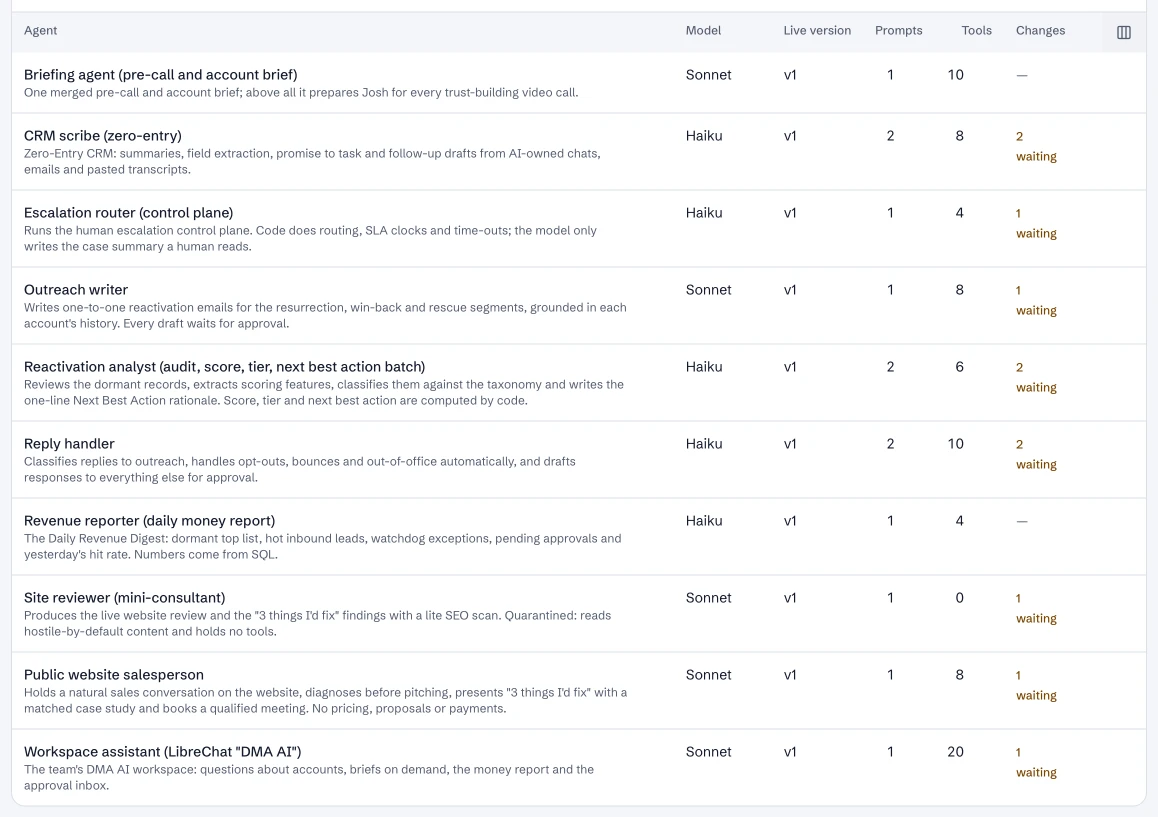
1 / 2Agents: each AI worker, its model, live version, prompts and tools.
- 1The website salesperson.
- 2Its live version.
- 3Another agent: the reactivation analyst.
Dashboard · Build → Agents. Captured from the running POC on September 25, 2026; synthetic data.
See it live
Opens the screen in the running POC, in a new tab.
| Open | Where | What to try |
|---|---|---|
| Agents | DMA AI dashboard | Open an agent to see its prompt, model and tools. |