Part A · How DMA AI works
A.8Security, approvals and control
Built in the POC- No.
- A.8
- Relates to DMA's book
- Decision Book p.5, p.7, p.8, p.34
- Part
- A · the foundation
What this part does · Decision Book p.5, p.7, p.8, p.34
DMA's book asks for approvals where DMA wants a person (with human override always available), consent and suppression policies before any customer-facing autonomy, safe deliverability, and governance over what the AI may write to the CRM.
Why DMA needs it: The AI touches DMA's customers and DMA's data. DMA needs to stop anything in one click, prove who approved what, and know that nobody can be contacted without a lawful basis.
How we do it
- Approvals work wherever the person is: the dashboard's Approvals page, one-tap links in an email (single-use, expiring, tied to the approver and the exact version they saw), or the DMA AI team workspace. A whole batch is one click, with an undo window before anything goes out.
- Four-eyes: whoever proposed a change can't approve it, and any change to the AI's rules or instructions needs a second person before it takes effect. Every decision is recorded with who, when and on which channel.
- Kill switches stop everything at once, or one thing: all AI model calls, outbound email, CRM writes, reply handling, the website chat's autonomy, transactions, a channel, or writes to one kind of Nutshell record. A pause takes effect on the next action, without a restart.
- Nobody is emailed without a lawful basis: a consent rule per country or region decides who can be contacted, opt-outs go on a suppression list that blocks sending in code, and in the prototype emails can only reach an allowlisted test inbox.
- DMA's data is protected in the bridge: message bodies and contact details are encrypted, each part of the system has its own limited database role, reps see only their own accounts, and the website chat treats every visitor message as untrusted text, never as an instruction.
The flow
It plays on its own while it's on screen; hover or use the controls to pause or step through.
An action is ready
A batch of reactivation emails is drafted.
- AI
- Routing
- Rule in code
- Person
- Screen
Where the data goes
The same six stages on every page. Nothing reaches Nutshell except through the write gate.
- 1Any action
Source
Emails, CRM changes, replies, rule changes.
- 2Sync
Copies Nutshell changes into the bridge database
Deletions and opt-outs in Nutshell are mirrored and honoured.
- 3Bridge database
A copy of the CRM data, plus what the AI works out
Approvals, signed links, kill switches, consent, the opt-out list and the audit log.
- 4AI
Claude models, only through DMA's own gateway
The AI never decides whether it may act; the controls do.
- 5Write gate
The only way back into Nutshell: checked, approved when needed, sent once
The write gate checks the switches and approvals again before writing.
- 6Nutshell
The system of record
Only approved, allowed changes reach it.
The tables behind it
Drawn from the POC's database catalogue: structure only, no data.
PK primary keyFK reference the database enforces (solid line)ID reference kept by id (dashed line)
| Table | What it holds | Columns |
|---|---|---|
| ctrl.approvals | Every approval: what it covers, who asked, who decided, when, on which channel, and the undo window. | 22 |
| ctrl.action_links | One-tap email links: single-use, expiring, tied to one person and one version. | 17 |
| ctrl.kill_switches | The switches, who paused them and why. | 9 |
| ctrl.consent | Who may be contacted, under which country's rule, and why. | 18 |
| ops.audit_log | Every sign-in and admin change, with before and after. | 12 |
Worked example
Synthetic demo data: every name, business and number is made up.
Approving, pausing and proving who did what
What you see
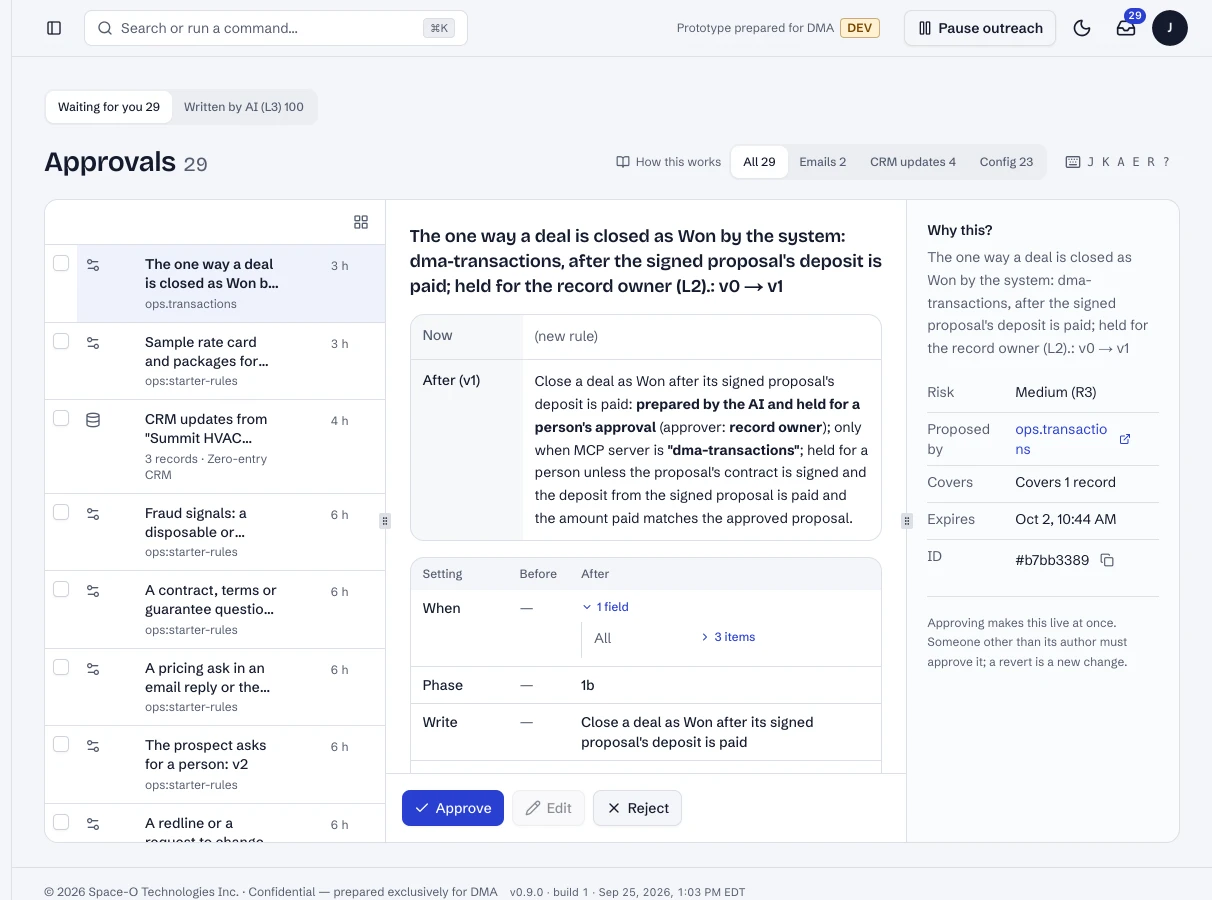
1.Everything waiting for a person
The Approvals page lists what waits; each item shows what it would do and why.
What happens in the system
- Bridge database
ctrl.approvalsEach item records who asked; the person who asked can't approve it.
- Rule engine
four-eyesEnforced in the database, not only on screen.
The switches in the prototype and what each one stops.
Kill switches
| Switch | What it stops |
|---|---|
| Everything | Every queued AI action is held; the chat falls back to taking contact details; nothing is dropped |
| AI model calls | Every call to the model, from every worker |
| Outbound email | All sending; queued emails wait, nothing is dropped |
| CRM writes | Every write to Nutshell; approved changes wait in the write gate |
| Reply handling | Automatic handling of replies to outreach |
| Website chat autonomy | The chat's own replies: visitors see "A DMA strategist will follow up" and a contact form |
| Transactions | E-signature and payment requests |
| A channel (email, web chat) | Everything on that channel |
| A record type (account, contact, lead) | Writes to that kind of Nutshell record |
One approval, as recorded (synthetic)
- What
- 8 reactivation emails, tier A
- Proposed by
- The outreach writer (AI)
- Approved by
- Jeev, from the email link
- Undo until
- 10 minutes after approval
- Blocked before approval
- 1 recipient: no lawful basis for their country
In the running POC
1 / 4Approvals: what waits for a person.
- 1The queue.
- 2Approve.
- 3Reject, with a reason.
Dashboard · Approvals. Captured from the running POC on September 25, 2026; synthetic data.
See it live
Opens the exact screen in the running POC, in a new tab.
Status
Built in the POC. This capability runs in the POC today, on synthetic data, end to end.