Part B · The screens
B.10Taxonomy
The labels the AI sorts things into: services ("service lanes"), intents, objections, lost reasons, buyer types, record classes and consent bases. Renaming or adding an item makes a new version that someone else approves.
- No.
- B.10
- Dashboard address
- /taxonomy
What you can do here
Each core task, and how many clicks it takes from this screen.
| Task | Clicks | How |
|---|---|---|
| Rename an item | 3 | Taxonomy → click the name, type, Enter → Save and submit. The approval shows how many records carry that label. |
| Add an item | 3 | Taxonomy → + on the parent (or Add item) → name and definition, Enter. It is saved as the next version and submitted. |
| See how many records carry each label | 1 | Taxonomy: the Records column, per item, for the live version. |
How it works behind the scenes
- Seven dimensions, each versioned. The AI classifies against the live version only: the account review sorts accounts into service lanes and lost reasons, the chat and reply handler read intents and objections, and Knowledge tags documents by service.
- A rename keeps the item's code, so every record already labelled keeps its label; a new item starts with no records. The approval says exactly how many records a change touches.
- A new version goes live only through the database's activation function, after someone other than its author approves it.
- Every item has a definition in words, and some have examples, so the model and a person read the same meaning. "Other" and "Insufficient evidence" exist on purpose, so the AI never has to force a label.
Rules and switches that apply here
- Four-eyes on every version.
- Only one version of each dimension is live at a time; older versions are kept.
The tables behind it
PK primary keyFK reference the database enforces (solid line)ID reference kept by id (dashed line)
| Table | What it holds | Columns |
|---|---|---|
| tax.taxonomies | The seven dimensions and which version of each is live. | 9 |
| tax.nodes | Every item of every version: code, name, definition, parent. | 13 |
| tax.classifications | Which records carry which label, and whether it is current. | 19 |
How the tables connect (4)
| Column | Points to | Kept by |
|---|---|---|
| tax.nodes.dimension | tax.taxonomy_versions | The database (foreign key) |
| tax.nodes.version | tax.taxonomy_versions | The database (foreign key) |
| tax.classifications.node_id | tax.nodes | The database (foreign key) |
| tax.classifications.prompt_id | agent.prompts | The application (by id) |
The screen
localhost:13301/taxonomy
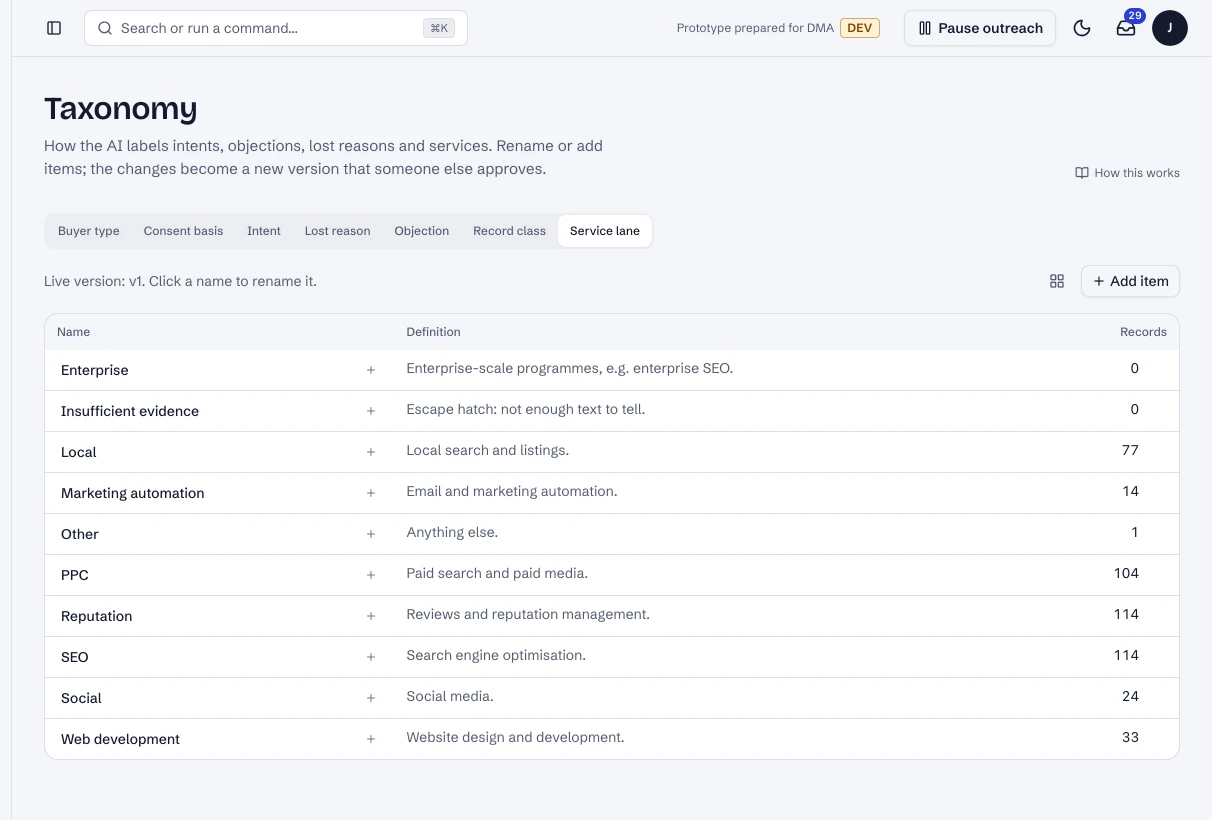
Taxonomy: the service lanes, with how many records carry each (live, synthetic data).
- 1An item: click its name to rename it.
- 2How many records carry it.
- 3Add an item.
Dashboard · Taxonomy, service lanes. Captured from the running POC on September 25, 2026; synthetic data.
See it live
Opens the screen in the running POC, in a new tab.
| Open | Where | What to try |
|---|---|---|
| Taxonomy | DMA AI dashboard | Pick a dimension; click a name to rename it. |