Part A · How DMA AI works
A.3Tools, split by risk
Built in the POC- No.
- A.3
- Relates to DMA's book
- Decision Book p.7, p.10, p.34
- Part
- A · the foundation
What this part does · Decision Book p.7, p.10, p.34
DMA's book lets the AI run the website conversation on its own, while anything that changes data, contacts a person or commits DMA follows the autonomy levels and guardrails.
Why DMA needs it: If the website chat could reach the CRM or the email system, one clever visitor could make it do damage. Keeping each worker's reach small keeps the risk small.
How we do it
- The AI workers never touch a database or Nutshell directly. They act only by calling tools, and the tools live on eight separate tool servers (MCP servers), grouped by how risky they are.
- The website chat's server offers six tools: search DMA's approved answers, fetch a case study, check open times, book a meeting, create or update the lead, and ask for a person. Website reviews come from a second, sandboxed server that only reaches public addresses. Nothing on either can send email, change a field in Nutshell or quote a price.
- Internal servers are split the same way: read-only account information; CRM changes that are only proposed (never written directly); email drafts and sending through the send governor; approvals and escalations; contracts (restricted); and pricing, proposals, e-signature and deposits, kept separate.
- Each server connects to the database with its own limited role, so even a mistake in a server can't read or write outside its lane. Every tool call is checked by the rule engine and logged.
The flow
It plays on its own while it's on screen; hover or use the controls to pause or step through.
The website chat has the smallest reach
Six public tools and a sandboxed website review. It can't email anyone, change the CRM or give a price.
- AI
- Rule in code
- Routing
- Stored data
Where the data goes
The same six stages on every page. Nothing reaches Nutshell except through the write gate.
- 1An AI worker
Source
A tool call from one of the ten workers.
- 2Sync
Copies Nutshell changes into the bridge database
Tools read the mirror; they never call Nutshell.
- 3Bridge database
A copy of the CRM data, plus what the AI works out
Each server reads and writes only through its own database role.
- 4AI
Claude models, only through DMA's own gateway
The worker decides which of its tools to call.
- 5Write gate
The only way back into Nutshell: checked, approved when needed, sent once
Write tools create outbox items; only the write gate talks to Nutshell.
- 6Nutshell
The system of record
Reached only through the write gate.
The tables behind it
Drawn from the POC's database catalogue: structure only, no data.
PK primary keyFK reference the database enforces (solid line)ID reference kept by id (dashed line)
| Table | What it holds | Columns |
|---|---|---|
| agent.mcp_servers | The eight tool servers, each with its risk class and database role. | 10 |
| agent.mcp_tools | Every tool, its risk level and the lowest autonomy it needs. | 13 |
| agent.tool_grants | Which worker version may use which tool. | 5 |
| ctrl.decision_log | Every tool call's decision and reasons. | 28 |
How the tables connect (6)
| Column | Points to | Kept by |
|---|---|---|
| agent.mcp_tools.server_key | agent.mcp_servers | The database (foreign key) |
| agent.tool_grants.agent_version_id | agent.agent_versions | The database (foreign key) |
| agent.tool_grants.tool_id | agent.mcp_tools | The database (foreign key) |
| ctrl.decision_log.agent_version_id | agent.agent_versions | The application (by id) |
| ctrl.decision_log.run_id | agent.runs | The application (by id) |
| ctrl.decision_log.conversation_id | conv.conversations | The application (by id) |
Worked example
Synthetic demo data: every name, business and number is made up.
One chat, three tool calls, three decisions
What you see
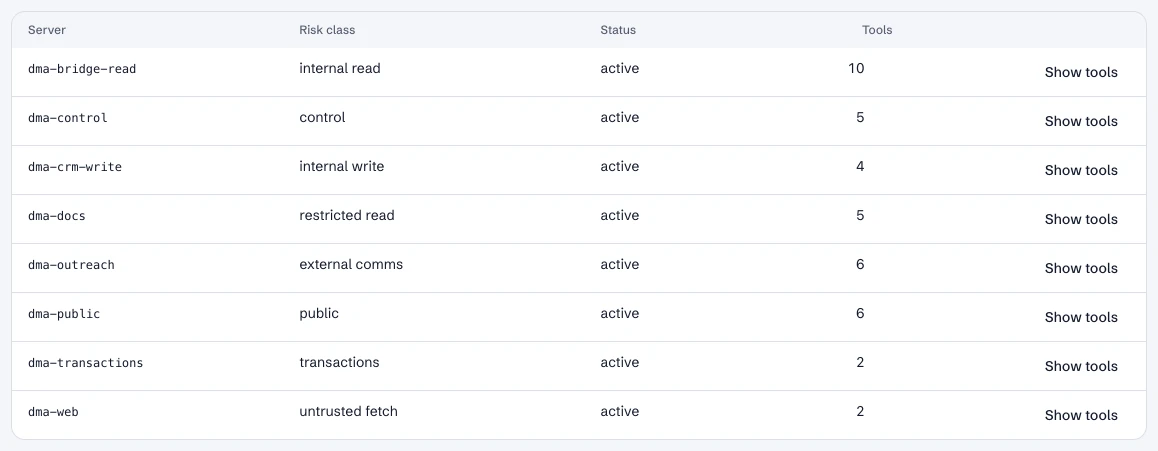
1.The tool servers and their risk
DMA's Tools page lists each server with its risk and its tools.
What happens in the system
- Bridge database
agent.mcp_serversThe public server connects to the database as the least-privileged role; it can read approved content and create leads only.
- Bridge database
agent.mcp_toolsSix tools on the public server, two on the website-review server; 40 tools across the eight servers.
Right-hand values come from a real run of the POC on September 25, 2026 (trace tr_muh5tbo52jgpqd0smgrf8, tr_muh5tbqv18g3rgfbfdhda…). Rows marked “sample” are illustrative.
The eight tool servers in the prototype, and what each is for.
Tool servers by risk
| Tool server | Risk | Tools | What it can do | Used by |
|---|---|---|---|---|
| Public | Public | 6 | Approved answers, case studies, open times, booking, lead capture, ask for a person | Website salesperson |
| Website review | Untrusted pages | 2 | Review a public website safely; read the review | Website salesperson |
| Bridge read | Internal, read-only | 10 | Account briefs, timelines, scores, search, knowledge base | Internal workers, team workspace |
| CRM write | Internal, proposes | 4 | Propose CRM updates and tasks; log a call; check a write's status | CRM scribe, reply handler |
| Outreach | External email | 6 | Draft email, check consent, send through the send governor, record opt-outs | Outreach writer, reply handler |
| Control | Control plane | 5 | Request and decide approvals; escalate to a person | Escalation router, workspace |
| Contracts | Restricted | 5 | Search contracts, answer with citations, compare with the template | Owner and president only |
| Transactions | Money | 2 | E-signature requests and their status | Kept separate, gated by approvals |
In the running POC
1 / 4Tools: the eight servers, their risk and their tools.
- 1The public server used by the website chat.
- 2The CRM-write server: it proposes changes, it never writes to Nutshell.
Dashboard · Build → Tools. Captured from the running POC on September 25, 2026; synthetic data.
See it live
Opens the exact screen in the running POC, in a new tab.
Status
Built in the POC. This capability runs in the POC today, on synthetic data, end to end.