Part B · The screens
B.14Rules
Everything the AI may and may not do, written as plain sentences: which actions each tool server may take, the send governor, the claims checker, the consent matrix, the circuit breakers, the escalation triggers and the sign-offs. Change a value, test it against recent decisions, submit it: someone else approves before it's live.
- No.
- B.14
- Dashboard address
- /rules
What you can do here
Each core task, and how many clicks it takes from this screen.
| Task | Clicks | How |
|---|---|---|
| Change a value in a rule | 3 | Rules → click the value in the sentence, type → Submit. It waits in Approvals → Config; Undo in the message discards it. |
| Test a change before submitting | 1 | In the rule's drawer: Test. It replays recent real decisions under the change and shows what would have gone differently. |
| Approve a colleague's rule change | 2 | Approvals → Config → Approve (the change opens selected). The author can't approve it. |
| Revert a rule to its previous version | 1 | Revert on the rule's row; like any change, it waits for approval. |
| Test a sentence against the claims checker | 2 | ⌘K → "Test a sentence" → paste, Enter: the verdict and why. |
| Copy the consent matrix for counsel | 2 | Rules → Consent → Copy for counsel review. |
How it works behind the scenes
- Rules are versioned data in the database, not code: each has its sentence, its value, who wrote it, who approved it and when. The rule engine enforces them on every action; a prompt can't override them.
- Seven groups on the screen: policy (which actions each tool server may take and up to which autonomy level), send governor (daily cap, send window, warm-up), claims (what may be said about DMA), consent (who may be e-mailed, by country and basis), breakers (automatic pauses), escalation (what goes to a person) and sign-offs.
- Testing a change replays a sample of recent decisions under the new version and lists what would have been allowed, held or refused differently.
- Some rules are placeholders until DMA gives the real value (for example the deal size that counts as a new tier); they are labelled so. The consent matrix is a draft pending DMA's counsel, and until it is signed off, sending is limited to test inboxes.
- Sign-offs gate whole steps, such as the Phase 0 dry run, and are requested and granted here by two different people.
Rules and switches that apply here
- Four-eyes on every change; the consent matrix also needs a counsel reference before it can go live.
- Only the activation function can make a rule version live; an edit to the database directly is refused.
The tables behind it
PK primary keyFK reference the database enforces (solid line)ID reference kept by id (dashed line)
| Table | What it holds | Columns |
|---|---|---|
| ctrl.policy_rules | Every rule version: its kind, key, the rule itself, status and approval. | 21 |
How the tables connect (1)
| Column | Points to | Kept by |
|---|---|---|
| ctrl.policy_rules.approval_id | ctrl.approvals | The application (by id) |
The screen
localhost:13301/rules
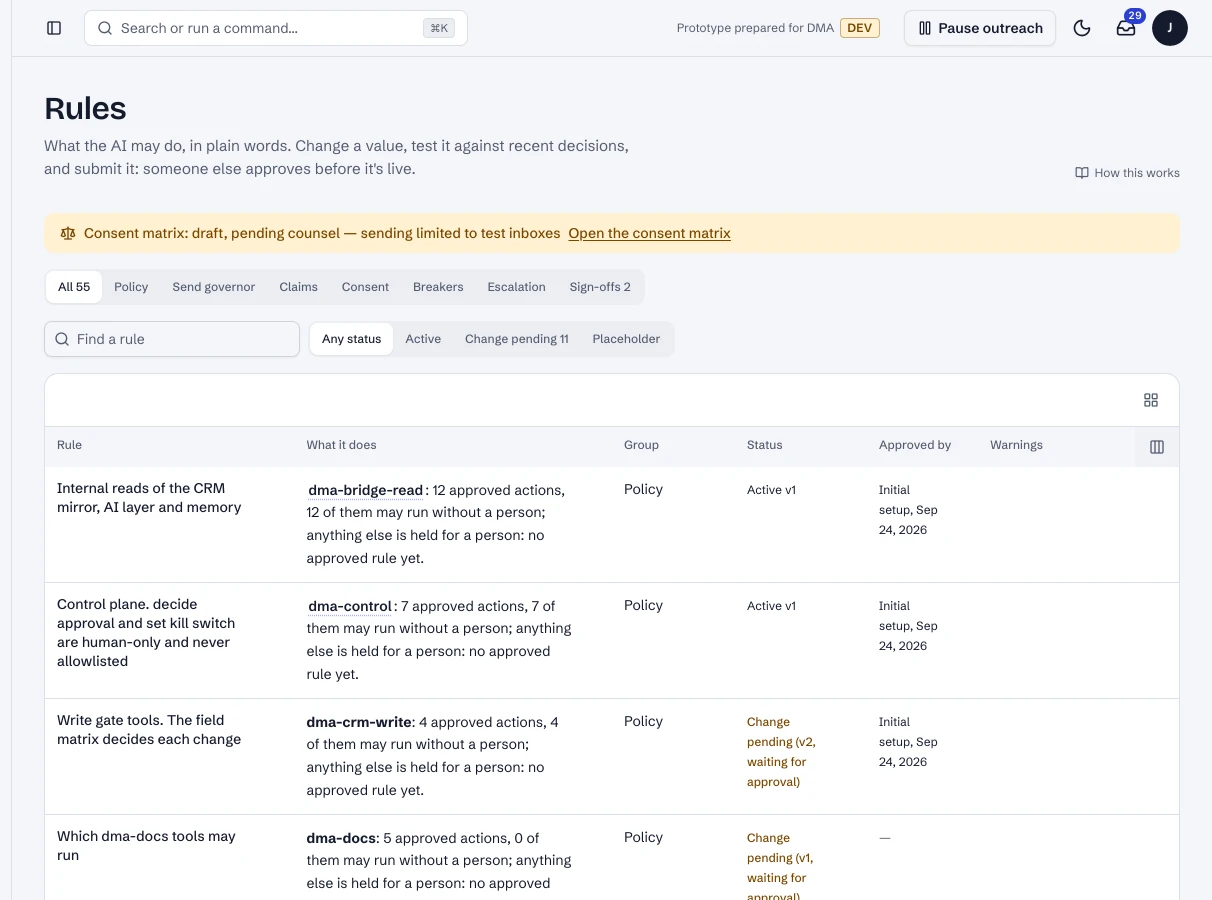
1 / 3Rules: each rule as a plain sentence, with its group, status and approver.
- 1Find a rule.
- 2One rule, what it does and its status.
Dashboard · Govern → Rules. Captured from the running POC on September 25, 2026; synthetic data.
See it live
Opens the screen in the running POC, in a new tab.
| Open | Where | What to try |
|---|---|---|
| Rules | DMA AI dashboard | Open a rule; Test replays recent decisions under a change. |