Part A · How DMA AI works
A.5The write gate: one door to Nutshell
Built in the POC- No.
- A.5
- Relates to DMA's book
- Decision Book p.2, p.14
- Part
- A · the foundation
What this part does · Decision Book p.2, p.14
DMA's book keeps Nutshell as the single system of record: every AI-run or human-run interaction writes itself back through approved API writes (summaries, fields, tasks, follow-ups), with Nutshell's own AI left off.
Why DMA needs it: If the AI wrote to Nutshell from many places, nobody could say what changed, why, or how to undo it. One door makes every change visible, approvable and reversible.
How we do it
- No AI worker can call Nutshell. Anything meant for Nutshell (a new lead, a note, a task, a field update) becomes one item in the write gate, with the exact change, the value it replaces, and the rule that allows it.
- Routine changes DMA allows the AI to make on its own (L3), such as a summary note or the AI fields, are approved automatically and go out after a short undo window. Everything else (L2) waits for a person in Approvals, alone or as one batch.
- Just before writing, the gate reads the record from Nutshell again. If a person changed that field in the meantime, the AI's change is not forced: it is stopped as a conflict and shown to the team to keep or re-propose.
- Each change is written once (a key stops duplicates), by the "DMA AI" user in Nutshell, within Nutshell's rate limits, and only while the kill switches allow it. What it replaced is journaled, so any change can be reverted with one click.
The flow
It plays on its own while it's on screen; hover or use the controls to pause or step through.
A change is proposed
After a call, the CRM scribe proposes a summary note, two field updates and a task.
- AI
- Stored data
- Routing
- Rule in code
- Person
- Nutshell
Where the data goes
The same six stages on every page. Nothing reaches Nutshell except through the write gate.
- 1Any worker
Source
A change proposed by the scribe, the analyst, the chat or a person.
- 2Sync
Copies Nutshell changes into the bridge database
Brings Nutshell's current values back, for the conflict check and the mirror.
- 3Bridge database
A copy of the CRM data, plus what the AI works out
The write gate's items, their approvals and the journal of every write.
- 4AI
Claude models, only through DMA's own gateway
The AI only proposes; it never writes.
- 5Write gate
The only way back into Nutshell: checked, approved when needed, sent once
Approval, undo window, conflict check, rate limit, kill-switch check, then one write.
- 6Nutshell
The system of record
Receives the change from the "DMA AI" user.
The tables behind it
Drawn from the POC's database catalogue: structure only, no data.
PK primary keyFK reference the database enforces (solid line)ID reference kept by id (dashed line)
| Table | What it holds | Columns |
|---|---|---|
| ctrl.outbox | The write gate: one row per change bound for Nutshell, with its state. | 28 |
| ctrl.write_journal | Every field written: the value before and after, and who wrote it. | 12 |
| ctrl.approvals | The approval that released a batch: who decided, when, on which channel. | 22 |
How the tables connect (1)
| Column | Points to | Kept by |
|---|---|---|
| ctrl.outbox.approval_id | ctrl.approvals | The database (foreign key) |
Worked example
Synthetic demo data: every name, business and number is made up.
A logged call's changes, from proposal to Nutshell
What you see
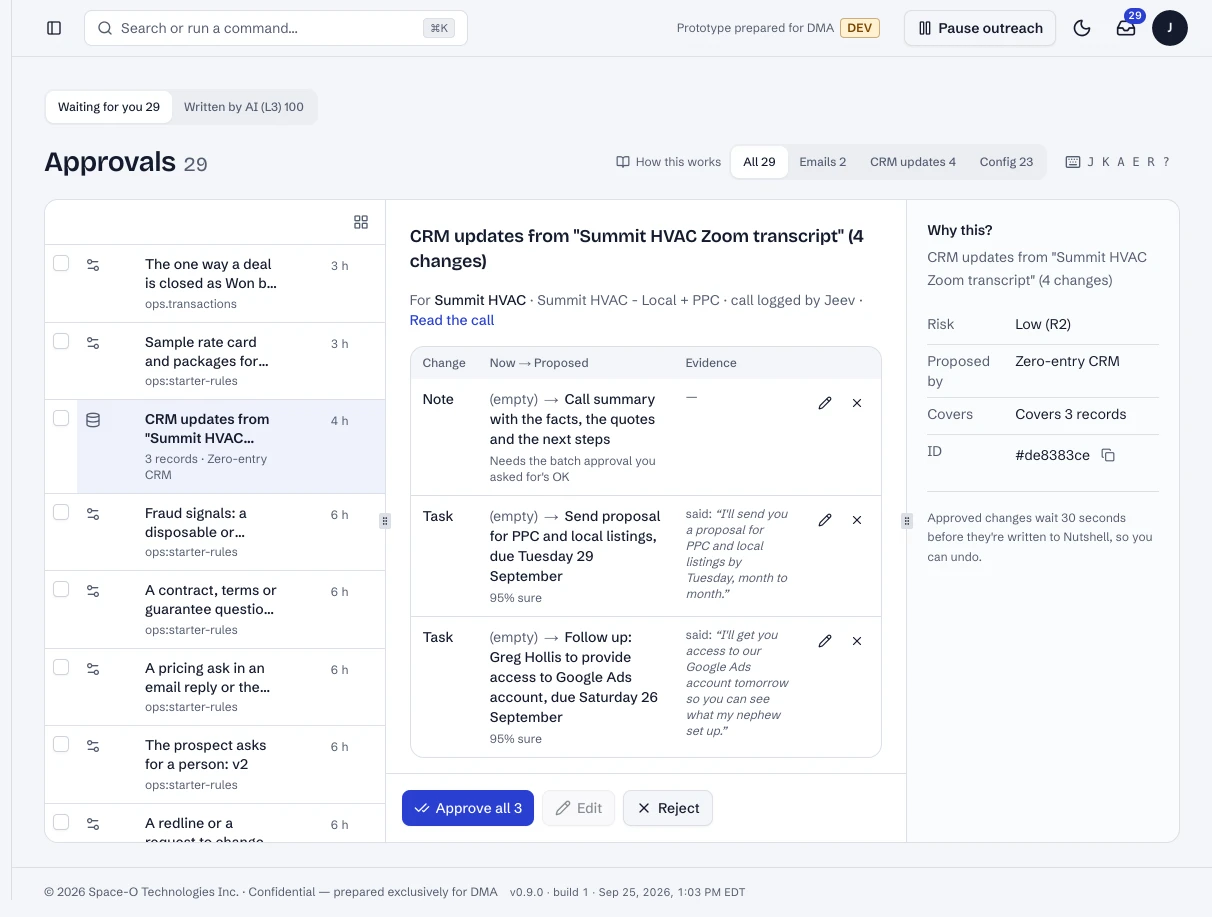
1.The proposed changes wait in one batch
After a call is logged, its CRM changes wait in Approvals, each line with the words it came from.
What happens in the system
- Tool call
dma-crm-write · propose_crm_updateThe scribe proposes; the tool creates write-gate items. It has no way to call Nutshell.
- Rule engine
field rulesEach line is checked against DMA's field rules: which fields the AI may write, on its own or with approval.
- Bridge database
ctrl.outboxOne item per change, with the value it would replace.
One call logged by a rep (synthetic example): five changes, two paths.
What the write gate does with each change
| Change | Level | Path | Ends as |
|---|---|---|---|
| Call summary note | L3 | Approved automatically; written after the undo window | Written |
| AI Summary field | L3 | Approved automatically; the old summary is journaled | Written |
| Next step date: Friday | L2 | Waits for the record owner in Approvals | Written after approval |
| Task: send the audit Friday | L2 | Approved in the same batch, one click | Written after approval |
| Deal stage | L2 | A person changed it in Nutshell first, so the AI's change stopped | Conflict: shown to keep or re-propose |
In the running POC
1 / 4A logged call's CRM changes, waiting as one batch.
- 1Each change and the words it came from.
- 2Approve the whole batch.
Dashboard · Approvals, a CRM change opened. Captured from the running POC on September 25, 2026; synthetic data.
See it live
Opens the exact screen in the running POC, in a new tab.
| Open | Where | What to try |
|---|---|---|
| Approvals | DMA AI dashboard | Changes waiting for a person, one click per batch. |
| Written by AI | DMA AI dashboard | Every change the AI made, with undo. |
| The CRM simulator | CRM simulator (stands in for Nutshell) | The written changes, as the team sees them. |
Status
Built in the POC. This capability runs in the POC today, on synthetic data, end to end.