Part B · The screens
B.2Approvals
One queue for everything the AI wants to do that needs a person: outreach e-mails, CRM updates from a call, proposals, and changes to the AI's own settings. A second tab lists what the AI wrote to Nutshell on its own, with undo.
- No.
- B.2
- Dashboard address
- /approvals
What you can do here
Each core task, and how many clicks it takes from this screen.
| Task | Clicks | How |
|---|---|---|
| Approve an e-mail | 2 | Approvals → A (or the Approve button). The e-mail waits 10 minutes before it is released, so you can undo. |
| Edit an e-mail, then approve it | 3 | Approvals → click the text and type → ⌘↵. The edited e-mail is claim-checked again before it goes. |
| Approve a whole wave or call batch | 2 | Approvals → Approve all. One click covers every e-mail in a wave, or every change from a logged call. |
| Reject with a reason | 3 | Approvals → R → pick the reason (the most likely one is preselected). |
| Approve from the e-mail digest | 1 | The Approve link in the digest e-mail; the result page offers Undo. |
| Approve a change to the AI's settings | 3 | Approvals → Config → A. Only someone other than the author can approve it. |
| Undo something the AI wrote to Nutshell | 3 | Approvals → Written by AI → Undo on the batch (or one row). The earlier values are put back. |
How it works behind the scenes
- Every item is a row in the approval queue with its risk level, a plain-English summary, the evidence and a "Why this?" panel. Nothing in it has happened yet.
- After you approve, e-mails wait 10 minutes and CRM changes 30 seconds before anything leaves, so U (or ⌘Z) undoes the last decision. Then e-mails go through the send governor (daily cap, send window, consent) and CRM changes through the write gate.
- The same queue answers from three places: this screen, the Approve / Reject links in the e-mail digest, and the team workspace (DMA AI). Slack is an optional extra channel.
- Proposals above the approved discount can be approved only by Josh; the screen says so on the item.
- Config changes (prompts, agent versions, tools, rules, knowledge, taxonomy) are approved here too, under four-eyes: the author can't approve their own change.
- Written by AI lists the changes the AI made to Nutshell at the level DMA allowed without asking (AI fields such as AI Service Lanes), in batches, each with Undo. If someone changed the same field in Nutshell since, it shows as a conflict: keep theirs or propose again.
- Keyboard: J / K move, A approves, E edits, R rejects, X selects, Shift + A approves the selection, ? lists every key.
Rules and switches that apply here
- Undo windows: 10 minutes for e-mails, 30 seconds for CRM changes.
- An edited e-mail is checked again by the claims checker; a claim the library can't back is blocked next to the editor.
- Kill switches: Pause outreach holds every approved send and write; "Outbound email" and "CRM writes" pause one side. Nothing approved is lost: it waits.
The tables behind it
PK primary keyFK reference the database enforces (solid line)ID reference kept by id (dashed line)
| Table | What it holds | Columns |
|---|---|---|
| ctrl.approvals | The queue: one row per item waiting for a person, with its risk, the decision and the undo window. | 22 |
| conv.email_drafts | The e-mail drafts, encrypted, with the checks they passed. | 39 |
| ctrl.outbox | The write gate: each approved Nutshell change and what it replaced, so it can be undone. | 28 |
How the tables connect (5)
| Column | Points to | Kept by |
|---|---|---|
| conv.email_drafts.conversation_id | conv.conversations | The application (by id) |
| conv.email_drafts.approval_id | ctrl.approvals | The application (by id) |
| conv.email_drafts.agent_version_id | agent.agent_versions | The application (by id) |
| conv.email_drafts.decision_id | ctrl.decision_log | The application (by id) |
| ctrl.outbox.approval_id | ctrl.approvals | The database (foreign key) |
The screen
localhost:13301/approvals
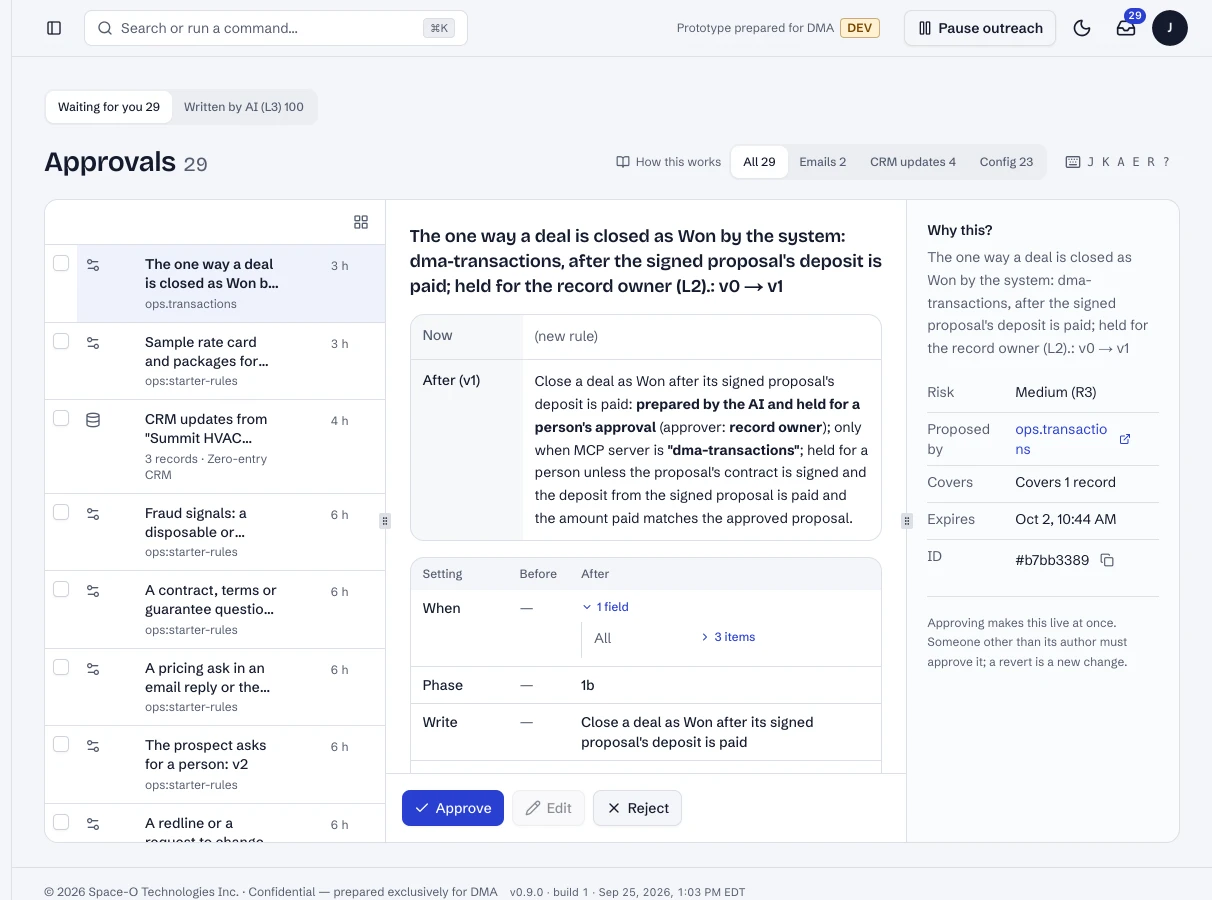
1 / 4Approvals: the queue, one item open.
- 1Everything waiting, newest first, filterable by kind.
- 2Approve.
- 3Reject with a reason.
Dashboard · Approvals. Captured from the running POC on September 25, 2026; synthetic data.
See it live
Opens the screen in the running POC, in a new tab.
| Open | Where | What to try |
|---|---|---|
| Approvals | DMA AI dashboard | Press ? for the keys; A approves, R rejects, U undoes. |
| Approvals → Written by AI | DMA AI dashboard | What the AI wrote on its own, with undo. |